Last Updated: May 2026. We research independently. Some links are affiliate links — this costs you nothing and helps fund our work.
Building an ergonomic workspace does not require a large budget. The most expensive components — premium chairs, electric standing desks, adjustable monitor arms — deliver meaningful improvements, but the fundamentals of good posture and reduced spinal strain can be achieved for significantly less.
Quick links:
👉 BONTEC Monitor Riser on Amazon →
This guide shows you how to build the most effective ergonomic setup possible in the UK for under £300 — where to spend, where to save, and how to upgrade gradually.
The Core Principle: Posture Over Features
The most common budget mistake is spending money on the wrong things.
| Wrong investment | Why it fails |
|---|---|
| Heated massage chair with no adjustable lumbar | Worse for your back than a £120 mesh chair with proper support |
| Standing desk at wrong height | Does less for your posture than a £25 monitor riser |
At every budget level, three fundamentals determine whether your setup actually supports you:
| Priority | Fundamental | Why it matters |
|---|---|---|
| 1 | Spinal support | Chair must hold lumbar spine in natural curve without muscular effort |
| 2 | Arm/shoulder position | Desk must allow forearms parallel to floor with shoulders relaxed |
| 3 | Eye level | Monitor at eye level at arm’s length – prevents forward head posture |
Get these three things right on a £250 budget and you will be more comfortable than someone who has spent £1,000 getting them wrong.
The Best Budget Ergonomic Setup Under £300 UK
| Item | Product | Price |
|---|---|---|
| Chair | SIHOO M18 Ergonomic Chair | £120–£200 |
| Monitor riser | BONTEC Monitor Stand Riser | £20–£35 |
| Desk | Your existing desk (optimised) | £0 |
| Total | £140–£235 |
This leaves £65–£160 in reserve for accessories — a footrest, wrist rest, or keyboard tray — depending on your needs.
1. The Chair: SIHOO M18 — Best Budget Ergonomic Chair UK
👉 Check Current Price on Amazon.co.uk →
– foundation of any budget ergonomic setup
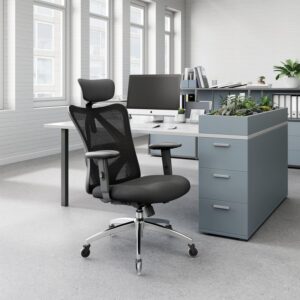
The SIHOO M18 is the strongest ergonomic chair available in the UK under £200. It delivers the non-negotiable ergonomic essentials — adjustable lumbar support, breathable mesh back, headrest — at a price that makes proper ergonomic seating accessible without dominating your total budget.
The adjustable lumbar support is the feature that separates the M18 from cheaper alternatives. Positioned correctly against your lower back, it maintains spinal support without requiring muscular effort — the core mechanism by which a good chair reduces back fatigue and pain.
The breathable mesh back prevents heat buildup through a long working day — particularly relevant in UK home offices during warmer months.
The honest limitations: Armrest adjustment is less comprehensive than the M57, and the lumbar adjustment range is narrower. For users with average proportions working 4–6 hours daily, these are manageable compromises.
Best for: Budget ergonomic setups, 4–6 hour daily sessions, first serious ergonomic chair upgrade
Key features: Adjustable lumbar, breathable mesh, headrest, solid SIHOO build quality
Consideration: More limited adjustment range than M57 — suitable for average proportions
👉 Check Current Price on Amazon.co.uk →
Budget Alternative: Hbada Ergonomic Chair
👉 Check Current Price on Amazon.co.uk →
– alternative under £150
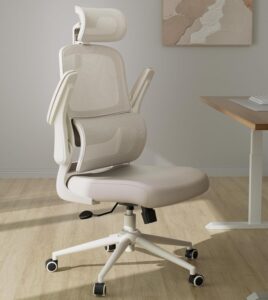
If the M18 is above your chair budget, the Hbada Ergonomic Chair is the most credible alternative under £150. It provides basic adjustable lumbar support, a mesh back, and a functional recline at a lower price point.
Build quality is lighter than SIHOO and the adjustment range is more limited, but it delivers a meaningful improvement over a standard non-ergonomic office chair.
👉 Check Current Price on Amazon.co.uk →
2. Monitor Riser: BONTEC — Biggest Impact Per Pound Spent
👉 Check Current Price on Amazon.co.uk →
– best value ergonomic upgrade under £35
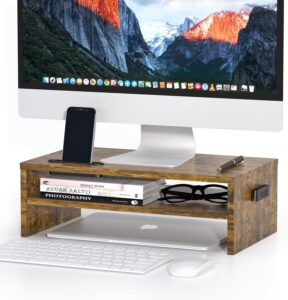
If you have a limited budget and can only spend money on one upgrade beyond your chair, spend it here.
The problem: most desks place a monitor at a height that requires you to look downward. Over six hours, this forward head posture places significant load on the cervical spine. For every inch the head moves forward, the effective load on the neck roughly doubles.
A monitor riser lifts the screen to approximately eye level, eliminating forward head posture entirely.
Correct monitor height: Top of screen at roughly eye level when sitting correctly. You should be looking slightly downward at the centre of the screen — not significantly downward at the bottom.
Best for: Any setup where monitor sits flat on desk, neck/upper back tension, smaller workspaces needing storage
Key features: Raises monitor to eye level, stable platform, desk storage underneath, affordable
Consideration: Fixed height — monitor arm offers more precise adjustment as future upgrade
👉 Check Current Price on Amazon.co.uk →
3. The Desk: Optimise What You Have
For a budget setup, buying a new desk is rarely the right move. The money is better spent on chair and monitor position.
Check your existing desk height:
| Situation | Fix |
|---|---|
| Desk too high | Higher chair setting + footrest (£15–£30) |
| Desk too low | Desk risers or consider new desk (lower priority) |
| Correct height | Forearms roughly parallel to floor when resting on desk, shoulders relaxed |
👉 See: Footrests on Amazon UK →
Smart Upgrade Path: Where to Spend Next
Once your core setup is in place, here is the order in which additional spending delivers the most ergonomic benefit:
| Priority | Upgrade | Cost | Why |
|---|---|---|---|
| 1 | Footrest | £15–£30 | If feet don’t sit flat on floor at correct chair/desk height |
| 2 | Monitor arm | £25–£50 | Replaces fixed riser with infinite adjustability |
| 3 | Keyboard/mouse position | £0 | Move them close enough that elbows stay at 90° without reaching |
| 4 | Upgrade to SIHOO M57 | £180–£300 | 4D armrests and wider lumbar range – noticeable over full day |
| 5 | Height-adjustable desk | £150–£300 | Sit-stand alternation – final major upgrade |
👉 See: Best Ergonomic Chairs Under £300 UK →
👉 See: Huanuo Single Monitor Arm on Amazon UK →
Common Budget Setup Mistakes
| Mistake | Why it’s wrong |
|---|---|
| Spending everything on desk, nothing on chair | Chair is where you spend entire working day. Good chair + basic desk outperforms premium desk + poor chair every time. |
| Buying cheapest possible chair (<£80) | Lack adjustable lumbar support. Cannot address primary mechanical cause of back pain regardless of cushioning. |
| Ignoring monitor height | £25 monitor riser does more for neck/upper back comfort than most £200 chair upgrades. Most underrated improvement. |
| Buying accessories before fundamentals | Wrist rests, lumbar cushions come AFTER chair, monitor height, desk height are correctly addressed. |
Final Verdict
The most effective budget ergonomic setup in the UK for under £300 is straightforward:
| Component | Product | Why |
|---|---|---|
| Chair | SIHOO M18 | Proper lumbar support + breathable mesh |
| Monitor | BONTEC riser | Screen to eye level – eliminates forward head posture |
| Desk | Your existing desk + footrest if needed | Correct height assessment |
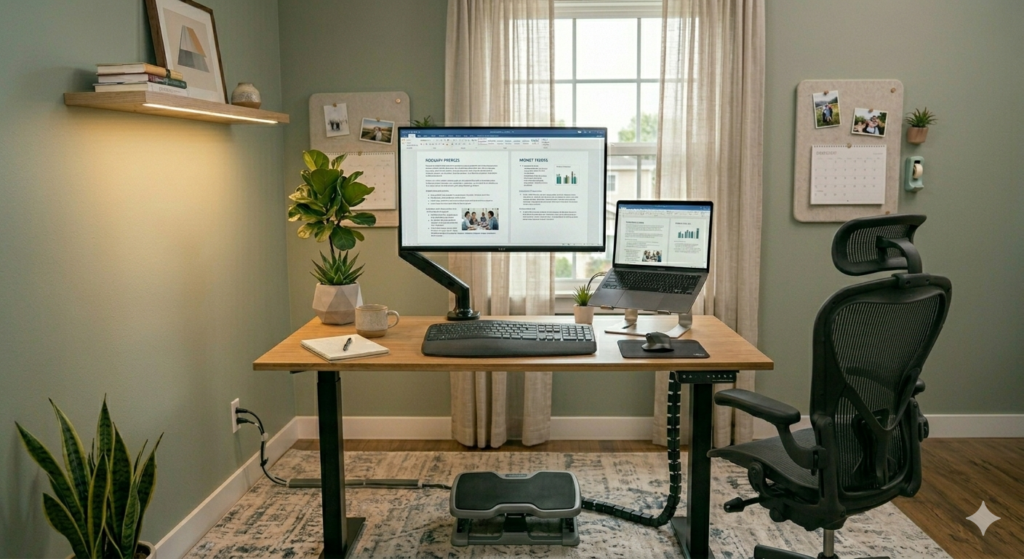
This combination addresses all three ergonomic fundamentals — spinal support, arm position, and eye level — at a total cost well under £300.
👉 View SIHOO M18 on Amazon UK →
👉 View BONTEC Monitor Riser on Amazon UK →
Frequently Asked Questions
Can you build a good ergonomic setup for under £300 in the UK?
Yes. The SIHOO M18 + monitor riser + correctly assessed desk height addresses the three primary ergonomic fundamentals for well under £300. It’s not equivalent to a £1,000 premium setup, but it removes the main causes of desk-related discomfort effectively.
What is the most important part of a budget ergonomic setup?
The chair. It’s the component you’re in direct contact with for the entire working day. Adjustable lumbar support is the feature most directly linked to back pain prevention. Do not compromise on this.
Is a standing desk worth it on a tight budget?
Not as a first priority. Spend on chair and monitor height first — they deliver more ergonomic benefit per pound. Once those are in place, a height-adjustable desk is a worthwhile next investment.
What is the cheapest ergonomic chair worth buying in the UK?
The Hbada Ergonomic Chair is the most credible option under £150. The SIHOO M18 is the stronger choice if you can stretch slightly further — the adjustable lumbar system and build quality are noticeably better.
How much should I spend on a monitor riser?
£20–£35 is sufficient for a stable, functional riser. The BONTEC is the most consistently well-reviewed option at this price on Amazon UK. A monitor arm (£25–£50) offers more adjustability as a second-stage upgrade.