
Last Updated: May 2026. We research independently. Some links are affiliate links — this costs you nothing and helps fund our work.
Most desk workers focus their ergonomic budget entirely on the chair — and then find that discomfort persists despite the upgrade.
The chair is the most important single component, but it is not the complete picture. Monitor height, wrist position, foot support, and standing fatigue are each addressed by specific accessories that cost a fraction of a chair upgrade.
Quick links:
This guide covers the best ergonomic accessories available in the UK in 2026 — each solving a specific, common problem — in order of impact.
Why Accessories Matter
| Problem | Chair alone | Accessory solution |
|---|---|---|
| Laptop screen too low | ❌ Doesn’t fix | Laptop stand (£20–£35) |
| Wrist/forearm pain | ❌ Doesn’t fix | Vertical mouse (£45–£70) |
| Feet not flat on floor | ❌ Doesn’t fix | Footrest (£25–£40) |
| Standing desk discomfort | ❌ Doesn’t fix | Anti-fatigue mat (£35–£80) |
| Poor wrist position during typing | ❌ Doesn’t fix | Ergonomic keyboard or wrist rest |
For desk workers who already have a reasonable chair, these accessories frequently deliver more relief per pound than upgrading to a more expensive chair.
Quick Comparison
| Accessory | Best For | Price Range |
|---|---|---|
| Babacom Laptop Stand | Screen height, neck strain | £20–£35 |
| Kensington Vertical Mouse | Wrist and forearm pain | £45–£70 |
| Huanuo Footrest | Sitting posture, circulation | £25–£40 |
| Anti-Fatigue Standing Mat | Standing desk comfort | £35–£80 |
| Logitech Ergo K860 | Typing comfort, wrist position | £80–£120 |
| Fellowes Wrist Rest | Budget wrist support | £15–£30 |
1. Babacom Laptop Stand — Best Overall Ergonomic Upgrade
👉 Check Current Price on Amazon.co.uk →
– most impactful accessory for laptop users
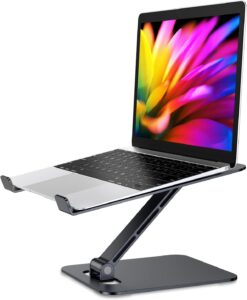
If you use a laptop as your primary work device and it sits flat on the desk, a laptop stand is the single most impactful ergonomic accessory you can add — more impactful than any accessory upgrade short of the chair itself.
The problem: A laptop screen on a desk positions the centre of the screen at chest height. Sustained focus at this height requires continuous forward head posture. For every inch the head moves forward, the effective load on the cervical spine increases substantially.
The fix: A laptop stand raises the screen to approximately eye level, eliminating forward head posture entirely.
The Babacom Aluminium Laptop Stand is the most consistently well-reviewed option at this price on Amazon UK — stable, adjustable across multiple angles, foldable for portability, and compatible with all standard laptop sizes.
The necessary companion accessory: An external keyboard and mouse. Raising the laptop screen to eye level moves the built-in keyboard to an unusable height.
Best for: Laptop users, remote workers, anyone experiencing neck pain from a low screen, small desk setups
Key features: Adjustable angle, aluminium construction, foldable, heat dissipation
Consideration: Requires external keyboard and mouse when used at eye level
👉 See Today’s Price on Amazon.co.uk →
2. Kensington Pro Fit Ergo Vertical Mouse — Best for Wrist Pain
👉 Check Current Price on Amazon.co.uk →
– eliminates forearm pronation stress
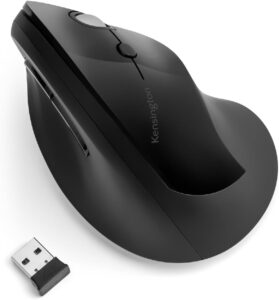
A conventional horizontal mouse requires the hand and forearm to remain in a pronated position (palm facing downward) throughout use. This sustained pronation places continuous rotational stress on the forearm muscles and tendons — a primary cause of wrist fatigue and repetitive strain.
A vertical mouse solves this by rotating the hand to a natural handshake position — thumb upward, palm facing inward — eliminating forearm pronation entirely.
The Kensington Pro Fit Ergo Vertical Mouse is the strongest option at this price in the UK — wireless, ergonomic contour fits a wide range of hand sizes, and adjustable sensitivity allows precise control.
The adjustment period is typically 1–3 days. Most users report that after adjusting, returning to a conventional mouse is noticeably uncomfortable — the clearest indication of how much pronation stress a conventional mouse creates.
Best for: Heavy mouse users, programmers, designers, office workers experiencing wrist or forearm fatigue
Key features: Vertical ergonomic grip, wireless, adjustable sensitivity, natural handshake position
Consideration: Adjustment period of 1–3 days — grip feels unfamiliar initially
👉 Check Current Price on Amazon.co.uk →
3. Huanuo Ergonomic Footrest — Best for Sitting Posture
👉 Check Current Price on Amazon.co.uk →
– for feet that don’t sit flat on floor
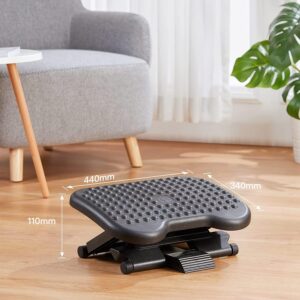
A footrest is one of the most underrated ergonomic accessories for UK desk workers.
The principle: Correct seated posture requires feet flat on a surface with thighs parallel to floor and knees at 90°. For many users — shorter than average, or with a desk taller than optimal — this is impossible without a footrest.
A footrest provides a raised surface for the feet, allowing the chair to be set at the correct height for arm and shoulder position while feet are fully supported.
Beyond posture, the Huanuo’s rocking function allows gentle foot movement that improves circulation and reduces leg fatigue.
Best for: Shorter users whose feet don’t rest flat on floor at correct chair height, users at desks taller than standard, anyone experiencing lower limb fatigue
Key features: Adjustable height, rocking function, anti-slip surface, compact footprint
Consideration: Not necessary if feet rest flat on floor comfortably at current chair/desk height
👉 Check Current Price on Amazon.co.uk →
4. Anti-Fatigue Standing Mat — Essential for Standing Desk Users
👉 Check Current Price on Amazon.co.uk →
– non-negotiable for standing desk owners
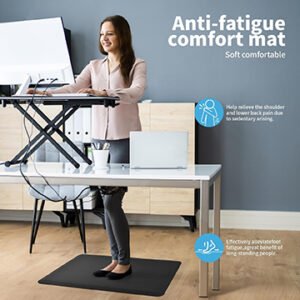
A standing desk without an anti-fatigue mat is a significantly less comfortable experience than it needs to be.
Standing on a hard floor for 15–20 minutes concentrates load on feet, ankles, and lower limbs — producing fatigue that makes standing feel unpleasant rather than beneficial.
An anti-fatigue mat uses cushioned material that encourages subtle continuous micro-movements, maintaining muscle activation and circulation. Most users who add one report standing longer and more consistently.
For UK home offices where flooring is typically wood or laminate, an anti-fatigue mat is effectively a prerequisite for getting genuine value from a standing desk.
What to look for: Minimum 70x50cm (larger is better), bevelled edges, at least 20mm thickness.
Best for: All standing desk users — this is not optional
Key features: Cushioned surface, bevelled edges, durable construction, minimum 20mm thickness
Consideration: Size matters — ensure mat covers full standing footprint with room for natural movement
👉 Check Current Price on Amazon.co.uk →
5. Logitech Ergo K860 — Best Ergonomic Keyboard
👉 Check Current Price on Amazon.co.uk →
– best for heavy typists (4+ hours daily)
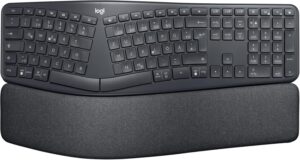
For desk workers who type extensively — developers, writers, analysts — the keyboard is a significant ergonomic factor that standard flat keyboards don’t address well.
A standard flat keyboard requires hands positioned with palms downward and wrists often deviated outward (ulnar deviation) — sustained stress on wrist tendons.
The Logitech Ergo K860 addresses this through a split curved design that allows hands to angle naturally inward and a curved key bed that reduces wrist extension. The integrated wrist rest maintains correct wrist alignment.
The K860 is wireless, compatible with multiple devices, and available in a UK layout.
Best for: Heavy typists, developers, writers, anyone experiencing wrist or forearm fatigue from extended typing on a standard keyboard
Key features: Split curved design, integrated wrist rest, wireless, multi-device, UK layout
Consideration: Higher price — most impactful for users typing 4+ hours daily
👉 Check Current Price on Amazon.co.uk →
6. Fellowes Memory Foam Wrist Rest — Best Budget Wrist Support
👉 Check Current Price on Amazon.co.uk →
– budget-friendly wrist support
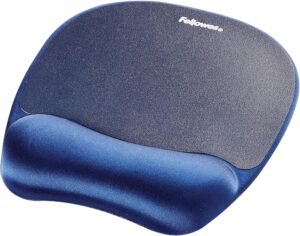
For users not ready to invest in a full ergonomic keyboard, a wrist rest is the most accessible wrist support upgrade.
The Fellowes Memory Foam Wrist Rest is the most consistently recommended option at this price in the UK — stable, correctly sized for standard keyboards, and firm enough that the wrist doesn’t sink below neutral position.
Critical point on correct use: A wrist rest supports the wrist between typing periods — during reading, thinking, or review — not during active typing. Resting wrists on any surface during typing creates carpal tunnel pressure.
Best for: Budget-conscious buyers, users wanting wrist support without full ergonomic keyboard, anyone whose wrists rest on desk between typing bursts
Key features: Memory foam cushioning, stable base, correct firmness for neutral wrist support
Consideration: Must be used between typing periods, not during active typing
👉 Check Current Price on Amazon.co.uk →
Building Your Accessory Setup: Recommended Order
| Priority | Accessory | When to buy |
|---|---|---|
| 1 | Laptop stand | If you use a laptop without external monitor |
| 2 | Vertical mouse | If you experience wrist/forearm fatigue |
| 3 | Footrest | If feet don’t rest flat on floor at correct chair height |
| 4 | Anti-fatigue mat | If you have a standing desk (non-negotiable) |
| 5 | Ergonomic keyboard | If you type 4+ hours daily and have wrist fatigue |
| 6 | Wrist rest | Budget alternative to ergonomic keyboard |
Common Mistakes When Buying Ergonomic Accessories
| Mistake | Why it’s wrong |
|---|---|
| Buying laptop stand without external keyboard | Raising screen makes built-in keyboard unusable. Buy together. |
| Using wrist rest during typing | Increases carpal tunnel pressure. Use between typing periods only. |
| Choosing undersized anti-fatigue mat | Too small to stand on comfortably. Size > brand. |
| Buying cheap foam anti-fatigue mat | Compresses within weeks. Look for 20mm+ thickness. |
| Treating accessories as chair substitute | Accessories complement a good chair — they don’t replace one. Fix chair first. |
Final Verdict
The most impactful ergonomic accessories for most UK desk workers, in priority order:
| Priority | Accessory | Why |
|---|---|---|
| 1 | Laptop stand | Eliminates forward head posture (laptop users) |
| 2 | Vertical mouse | Eliminates forearm pronation stress |
| 3 | Footrest | Enables correct seated posture when feet don’t reach floor |
| 4 | Anti-fatigue mat | Makes standing desk usable (non-negotiable) |
| 5 | Ergonomic keyboard | Reduces wrist stress for heavy typists |
None require a significant investment. Together, they address ergonomic factors that a chair alone cannot.
👉 View all recommended accessories on Amazon UK →
Frequently Asked Questions
What is the best ergonomic accessory for UK desk workers?
For laptop users: a laptop stand (eliminates forward head posture). For heavy mouse users: a vertical mouse (eliminates forearm pronation). For standing desk users: an anti-fatigue mat (non-negotiable).
Do ergonomic accessories actually make a difference?
Yes — each addresses a specific mechanical cause of discomfort that a chair alone cannot resolve. The improvements are targeted and measurable.
What helps most with wrist pain from mouse use?
A vertical ergonomic mouse — the Kensington Pro Fit Ergo is the strongest option at this price in the UK. It eliminates sustained forearm pronation.
Is an anti-fatigue mat necessary with a standing desk?
Yes — for most UK home offices with hard flooring. Standing on a hard surface produces fatigue that makes standing feel unpleasant. An anti-fatigue mat resolves this.
Are ergonomic keyboards worth the investment?
For heavy typists (4+ hours daily) experiencing wrist or forearm fatigue — yes. The Logitech K860 is the most comprehensive option at its price. For lighter typists, a wrist rest used correctly is a lower-cost alternative.