Last Updated: May 2026. We research independently. Some links are affiliate links — this costs you nothing and helps fund our work.
A monitor arm is one of the highest-impact, lowest-cost ergonomic upgrades for a UK desk setup.
A screen sitting flat on a desk places the centre of the display at roughly chest height for most users — which means sustained downward gaze, forward head posture, and progressive neck and upper back tension over a working day. A monitor arm raises the screen to eye level and keeps it there, eliminating this postural loading entirely.
Beyond ergonomics, a monitor arm frees up 20–30 cm of desk depth and allows the screen to be repositioned instantly for different tasks or different users.
Quick links to today’s top picks:
This guide covers the best monitor arms available in the UK in 2026 for both single and dual monitor setups.
What to Look for in a Monitor Arm
| Feature | Why it matters |
|---|---|
| Gas spring mechanism | Effortless one-finger repositioning. Monitor stays exactly where you put it. |
| VESA compatibility | Most monitors use 75x75mm or 100x100mm. Check your monitor before buying. |
| Weight capacity | 27″ monitor = 4–7kg. 32″ = 8–10kg. Check arm specs against your monitor. |
| Full adjustability | Height + depth + tilt + 360° rotation (portrait mode for coding/reading) |
| Desk clamp vs grommet | Clamp = easy. Grommet (through desk hole) = more stable for heavy setups. |
Our Top Picks at a Glance
| Monitor Arm | Best For | Type | Current Price (Amazon UK) |
|---|---|---|---|
| Ergotron LX | Best overall single arm | Single | £80–£120 |
| Huanuo Dual | Best overall dual arm | Dual | £45–£80 |
| Huanuo Single | Best value single arm | Single | £25–£45 |
| North Bayou | Best budget single arm | Single | £20–£40 |
| BONTEC Dual | Best budget dual arm | Dual | £35–£60 |
Prices change daily on Amazon UK. The links below go to the most reliable seller at today’s best price.
1. Ergotron LX — Best Overall Single Monitor Arm UK
👉 Check Current Price on Amazon.co.uk →
– the benchmark single monitor arm
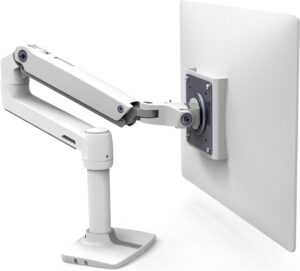
The Ergotron LX is the benchmark single monitor arm for UK home office and professional setups. It’s the product most consistently recommended by ergonomics professionals and independent reviewers.
The gas spring mechanism allows the monitor to be repositioned with a single finger — up, down, toward you, away — and it stays exactly where you place it without drift. Over a working day where you adjust between sitting and standing, recline for reading, or turn the screen to show someone, this effortlessness is genuinely useful.
The adjustment range is comprehensive: height covers both seated and standing positions, reach clears most desk depths, and 360-degree rotation enables portrait mode for coding or document review.
Build quality is immediately apparent — the arm feels engineered rather than manufactured to a price. Cable management channels are well designed, and the desk clamp and grommet mount are both included.
The Ergotron LX supports monitors up to approximately 11 kg, covering virtually all standard single monitors up to 34 inches.
Best for: Home office workers, standing desk users, anyone wanting the most reliable single monitor arm in the UK
Key features: Gas spring mechanism, wide height and reach range, 360° rotation, cable management, desk clamp + grommet mount included
Consideration: Higher price than budget alternatives — but the quality difference is immediately felt
👉 See Today’s Prices on Amazon.co.uk →
2. Huanuo Dual Monitor Arm — Best Overall Dual Arm UK
👉 Check Current Price on Amazon.co.uk →
– best dual monitor arm for most UK buyers
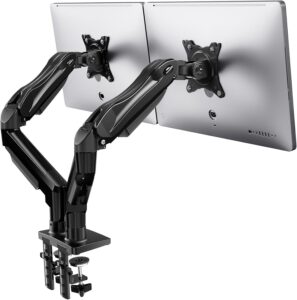
The Huanuo Dual Monitor Arm is the strongest value dual-monitor solution on Amazon UK. Its combination of independent arm adjustment, gas spring mechanism, integrated cable management, and competitive price makes it the natural starting point for anyone running two screens.
The two arms are independently adjustable — each monitor can be at a different height, depth, and angle. For dual-screen setups, the primary screen should be directly in front at eye level, while the secondary sits immediately beside it at the same height. The Huanuo allows this configuration precisely.
The gas spring mechanism on each arm allows effortless repositioning — particularly useful when switching between sitting and standing positions with a height-adjustable desk.
Integrated cable management routes display cables cleanly along each arm. Each arm supports monitors up to approximately 8 kg — suitable for most 27-inch monitors.
Best for: Developers, designers, multi-screen home office workers, standing desk users with dual monitors
Key features: Independent dual arm adjustment, gas spring mechanism, integrated cable management, robust desk clamp
Consideration: Check per-arm weight limit for larger screens (32″ +)
👉 Check Current Price on Amazon.co.uk →
3. Huanuo Single Monitor Arm — Best Value Single Arm UK
👉 Check Current Price on Amazon.co.uk →
– best value single monitor arm
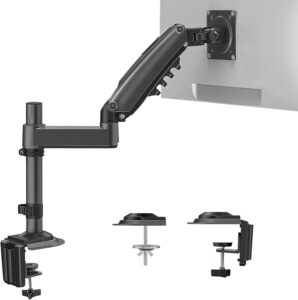
The Huanuo Single Monitor Arm delivers the core functionality of a monitor arm at a price that makes the upgrade accessible for buyers who can’t stretch to the Ergotron LX.
The gas spring mechanism provides smooth repositioning and holds the monitor position reliably without drift. Height, depth, tilt, and rotation adjustment are all available. Cable management channels route display cables adequately.
Honest comparison with Ergotron LX: The Huanuo’s mechanism requires slightly more force to reposition, the build quality is lighter, and the adjustment range is somewhat narrower.
For users who set their monitor position once and rarely change it, these differences are academic. For users who reposition frequently — particularly those switching between sitting and standing — the Ergotron’s effortless gas spring is worth the premium.
For most UK home office buyers running a single monitor, the Huanuo Single delivers everything needed.
Best for: Budget-conscious buyers, single monitor setups, users who set position once and adjust occasionally
Key features: Gas spring mechanism, full height and reach adjustment, cable management, 360° rotation
Consideration: Slightly more force required than Ergotron; lighter build quality
👉 Check Current Price on Amazon.co.uk →
4. North Bayou Monitor Arm — Best Budget Single Arm UK
👉 Check Current Price on Amazon.co.uk →
– best budget single monitor arm
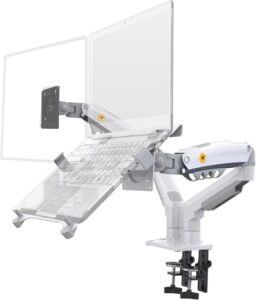
The North Bayou Monitor Arm is the most capable budget option at the entry-level price point. It’s a credible starting point for buyers who want the posture benefit of an eye-level screen without spending on a premium arm.
The spring-assisted mechanism (rather than full gas spring) provides adequate repositioning for occasional adjustments but requires more deliberate force than the Huanuo or Ergotron. For users who set the monitor height and leave it, this is a non-issue.
Build quality is lighter than the alternatives, and cable management is more basic. For a single monitor in a relatively static home office where the primary goal is getting the screen to eye level, the North Bayou achieves this at the lowest price in this guide.
Best for: Entry-level buyers, static setups, users primarily wanting screen height improvement at minimum cost
Key features: Spring-assisted mechanism, height and tilt adjustment, basic cable management, affordable
Consideration: Spring mechanism rather than gas spring; lighter build; less suited to frequent repositioning
👉 Check Current Price on Amazon.co.uk →
5. BONTEC Dual Monitor Arm — Best Budget Dual Arm UK
👉 Check Current Price on Amazon.co.uk →
– best budget dual monitor arm
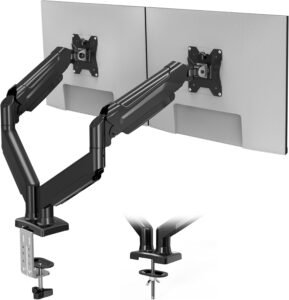
The BONTEC Dual Monitor Arm is the most affordable dual-arm option on Amazon UK and the correct choice for budget-conscious buyers who need two monitors at eye level without the Huanuo’s price point.
Independent arm adjustment allows each monitor to be positioned separately — the key functional requirement for any dual-monitor setup. The spring mechanism provides adequate adjustment for setting positions, though less smoothly than gas spring alternatives.
Honest trade-off vs Huanuo: Lighter construction, less smooth repositioning, narrower adjustment ranges.
For a budget static dual-monitor setup where both screens are positioned once at the correct height and left there, these limitations are acceptable. For standing desk users who need to frequently reposition both screens, the Huanuo’s gas spring is worth the extra cost.
Best for: Budget dual-monitor setups, static configurations, buyers needing two screens at eye level at minimum cost
Key features: Independent dual arm adjustment, spring mechanism, basic cable management, budget price
Consideration: Spring mechanism; lighter build; less suited to frequent repositioning than Huanuo
👉 Check Current Price on Amazon.co.uk →
Monitor Arm Setup: Getting It Right
A monitor arm is only as useful as the position you configure it to.
| Setting | What to do |
|---|---|
| Height | Top of screen at approximately eye level when sitting correctly. For standing desk users, save both sitting and standing heights. |
| Distance | Approximately 50–70cm from your eyes — roughly arm’s length. |
| Tilt | Screen angled slightly backward — 10–15 degrees from vertical — to reduce glare and allow natural slight downward gaze. |
| Dual monitors | Primary monitor directly in front at eye level. Secondary immediately adjacent at the same height. If using both equally, centre the join directly in front of you. |
Monitor Arms and Standing Desks
A monitor arm is particularly valuable with a standing desk because it enables the monitor to be adjusted to the correct height for both sitting and standing positions — which differ by approximately 30–40cm for most users.
Without a monitor arm, switching from sitting to standing means either accepting a screen at the wrong height for one position, or manually moving the monitor each time.
With a gas spring arm, raising the monitor from sitting to standing height takes seconds and no tools.
👉 See Best Standing Desks UK →
Single vs Dual Monitor Arm: Which Do You Need?
| Setup | Recommendation |
|---|---|
| One monitor | Single arm. Ergotron LX for quality, Huanuo Single for value, North Bayou for budget. |
| Two monitors (same size/weight) | Dual arm. Huanuo Dual is strongest value. BONTEC Dual for budget. |
| Two monitors (different sizes/weights) | Two single arms. Provides more independent flexibility per screen. |
Final Verdict
For most UK home office workers running a single monitor, the Huanuo Single Monitor Arm is the most rational purchase — gas spring mechanism, full adjustability, and integrated cable management at an accessible price.
For users who reposition frequently or want the most reliable arm available, the Ergotron LX is worth the premium.
For dual monitor setups, the Huanuo Dual Monitor Arm is the strongest overall choice — independent gas spring arms, integrated cable management, and strong UK availability at a competitive price.
👉 View All Recommended Monitor Arms In The UK →
Frequently Asked Questions
What is the best monitor arm in the UK?
The Ergotron LX is the benchmark single monitor arm for quality and reliability. The Huanuo Single is the strongest value alternative. For dual monitor setups, the Huanuo Dual is the most consistently recommended option on Amazon UK.
Are monitor arms worth buying?
Yes — for any desk worker with a screen at desk height. Raising the monitor to eye level eliminates forward head posture, one of the most common causes of neck and upper back tension. The improvement is immediate and costs far less than most ergonomic upgrades.
What VESA size do I need?
Check the back of your monitor. Standard patterns are 75x75mm and 100x100mm. Most monitor arms support both with included adapters.
Can I use a monitor arm with a standing desk?
Yes — and it’s particularly valuable. A gas spring arm allows the screen to be quickly repositioned to the correct height for both sitting and standing positions.
How much weight can a monitor arm hold?
Check the arm’s stated capacity against your monitor’s weight. Most single arms handle 4–9kg, covering monitors up to 27–32 inches. Dual arms rate each side independently — verify both monitors are within the per-arm limit.
Is a dual monitor arm better than two single arms?
Dual arms are neater and typically cheaper than two singles. Two single arms provide more independent flexibility and are better for significantly different monitor sizes or weights. For most standard dual setups with similarly sized screens, a dual arm is the more practical solution.